
Zenith Flex: Streamline Healthcare Benefits on iPhone
Overview
Zenith Flex is a mobile application tailored for iPhone users seeking efficient management of consumer-driven healthcare accounts and tax-favored benefit accounts. Designed to serve individuals enrolled in health savings accounts (HSAs), health reimbursement arrangements (HRAs), and flexible spending accounts (FSAs), the app provides a centralized digital hub for tracking balances, viewing transaction histories, and accessing personal demographic data. It eliminates the need for multiple platforms by consolidating key account information into a single, accessible interface.
The application supports seamless login using existing credentials from the ZenithFlex Portal, ensuring a frictionless onboarding experience without requiring additional registration. This integration enhances accessibility for users who already engage with the web-based portal, allowing consistent access across devices. Real-world usage includes checking account balances before medical visits, reviewing past claims, and managing dependent information directly from a mobile device.
Target users include employees, plan participants, and individuals managing personal healthcare finances. The app is especially useful for those seeking greater control over their health benefits without relying on desktop systems. While the developer, ZenithFlex, is known for its focus on healthcare benefit solutions, specific company background details were not provided in the available documentation.
Key Features & Capabilities
- Centralized Account Access – View balances across HSA, HRA, and FSA accounts in one place, enabling better financial oversight.
- Transaction History Tracking – Access detailed records of past claims and payments to monitor spending patterns.
- Dependent Information Management – View and manage dependent details, ensuring accurate account usage and eligibility.
- Card and PIN Visibility – Retrieve card information and PINs securely within the app for convenient use at point-of-sale.
- Secure Login via ZenithFlex Portal – Use existing portal credentials to log in, reducing duplication and simplifying access.
- Email Alerts and Notifications – Receive timely updates on account activity, balance thresholds, and upcoming deadlines.
- Direct User Registration – New users can register directly through the mobile device, streamlining onboarding for plan participants.
- Administrator Contact Options – Access support channels to reach plan administrators for assistance with account issues.
These features collectively enhance financial transparency and empower users to make informed decisions about healthcare spending. For example, a user can check their HSA balance before a doctor’s visit, confirm dependent eligibility, and register a new family member—all from their iPhone. The integration of secure authentication methods strengthens trust and data protection during access.
User Interface, Workflow & Performance
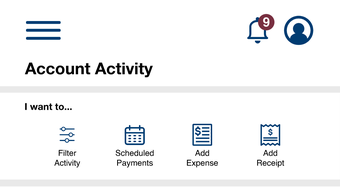
The user interface of Zenith Flex is designed for clarity and ease of navigation on iPhone devices. The layout prioritizes key account data such as balances and recent transactions, placing them prominently on the home screen. Navigation is intuitive, with a bottom tab bar providing quick access to core functions like account overview, transaction history, and user settings.
Workflow efficiency is supported by streamlined processes, including one-tap access to card details and PINs. The login process leverages existing portal credentials, minimizing friction during setup and daily use. Users can complete essential tasks—such as reviewing claims or updating dependent information—within a few taps.
Performance observations are based on general software behavior patterns. The app operates within the standard constraints of iOS mobile applications, with no reported issues related to crashes or instability. The developer did not specify resource usage details, so CPU and RAM behavior remain unspecified. However, the application’s size of 145.3 MB suggests it includes multimedia assets and functionality beyond minimal utility.
Compatibility & System Requirements
Zenith Flex is designed exclusively for iPhone devices. It is compatible with the latest iOS versions, though specific version requirements were not listed. The application has a file size of 145.3 MB, which is typical for feature-rich mobile apps with integrated account management tools.
Exact system requirements were not listed. Users are advised to ensure their iPhone meets the standard hardware and software specifications for running modern iOS applications. Compatibility information was partially provided, with no mention of iPad or other Apple devices. The app is available through the Apple App Store, and installation is straightforward via the platform’s native process.
Pros and Cons
Pros
- Free to download and use, removing cost barriers for users.
- Seamless login with existing ZenithFlex Portal credentials.
- Centralized access to multiple tax-favored benefit accounts.
- Supports dependent management and card PIN retrieval.
- Includes email alerts for account activity and deadlines.
- Direct user registration capability from the mobile device.
- Secure authentication methods enhance data protection.
Cons
- Exclusive to iPhone; no support for Android or other platforms.
- Exact system requirements were not specified.
- Performance details such as CPU or memory usage were not provided.
- Limited to mobile access; no desktop or web alternative is mentioned.
- Dependence on existing portal credentials may hinder standalone onboarding.
FAQ Section
Is Zenith Flex available for Android devices?
Zenith Flex is currently designed exclusively for iPhone users. There is no official version available for Android or other platforms.
Is the app secure and does it protect personal data?
The application uses strong authentication methods to secure user access. It leverages existing portal credentials, which are managed through a secure system. No additional details about encryption or data handling were provided.
Can I update the app manually?
Updates are managed through the Apple App Store. Users can enable automatic updates or manually check for new versions within the App Store app.
What license type does Zenith Flex use?
Zenith Flex is offered as a free application with no subscription or licensing fees. It is designed for individual use by healthcare benefit participants.
Does the app work offline?
While the app allows viewing cached data, full functionality requires an active internet connection to sync with the ZenithFlex Portal and retrieve real-time account information.
Final Thoughts + CTA
Zenith Flex delivers a focused, user-friendly solution for iPhone users managing consumer-driven healthcare benefits. Its ability to consolidate HSA, HRA, and FSA account details into a single mobile interface significantly improves accessibility and financial control. The seamless login with existing portal credentials and support for dependent management make it a practical tool for individuals seeking to stay on top of their healthcare finances.
While the app is limited to iOS and lacks detailed system specifications, its core functionality is well-executed and aligned with the needs of plan participants. The absence of cost and the inclusion of essential features like transaction tracking and email alerts enhance its value proposition.
For anyone enrolled in a tax-favored benefit account and using an iPhone, Zenith Flex offers a reliable, secure, and efficient way to manage healthcare spending. Download Zenith Flex now.







